

Case study · SDWAN Monitoring · VMware VeloCloud
One look tells a network admin which of 1,721 offices are in trouble, and why.
The worst and the best at a glance, and the story behind each.

TL;DR
VMware VeloCloud is SD-WAN: a small box, an edge, in every branch office, with two or three internet lines behind it, and software that picks the best line for every call and every app without asking anyone. The Orchestrator is the console admins use to watch all of it. For Sam, who runs 1,700 of them, the old monitoring was one table of everything, which meant nothing stood out.
The dashboard now shows the worst and best performers at a glance, and for the worst, a temporal and holistic picture of what went wrong: one clear, intuitive snapshot.
Sam has about a minute. Which one does he fix first?
Sam runs the network for a company with 1,700 branch offices. Each office has a small box, an edge, with two or three internet lines behind it. The SD-WAN software picks the best line for every call and every app, all day, without asking him.
Most days that works. Today it does not. A site in Bogota has dropped nine times since breakfast. Berlin is up, but voice calls there sound like a bad phone line. Someone in Sheabury is eating 89% of their circuit and nobody knows on what.
The old monitoring gave Sam everything: every edge, every link, every tunnel, in a table. Everything is the same as nothing. Miss the flapping site and the regional manager calls. Miss the slow one and sales blames the product. Miss the hot one and the next outage is his.
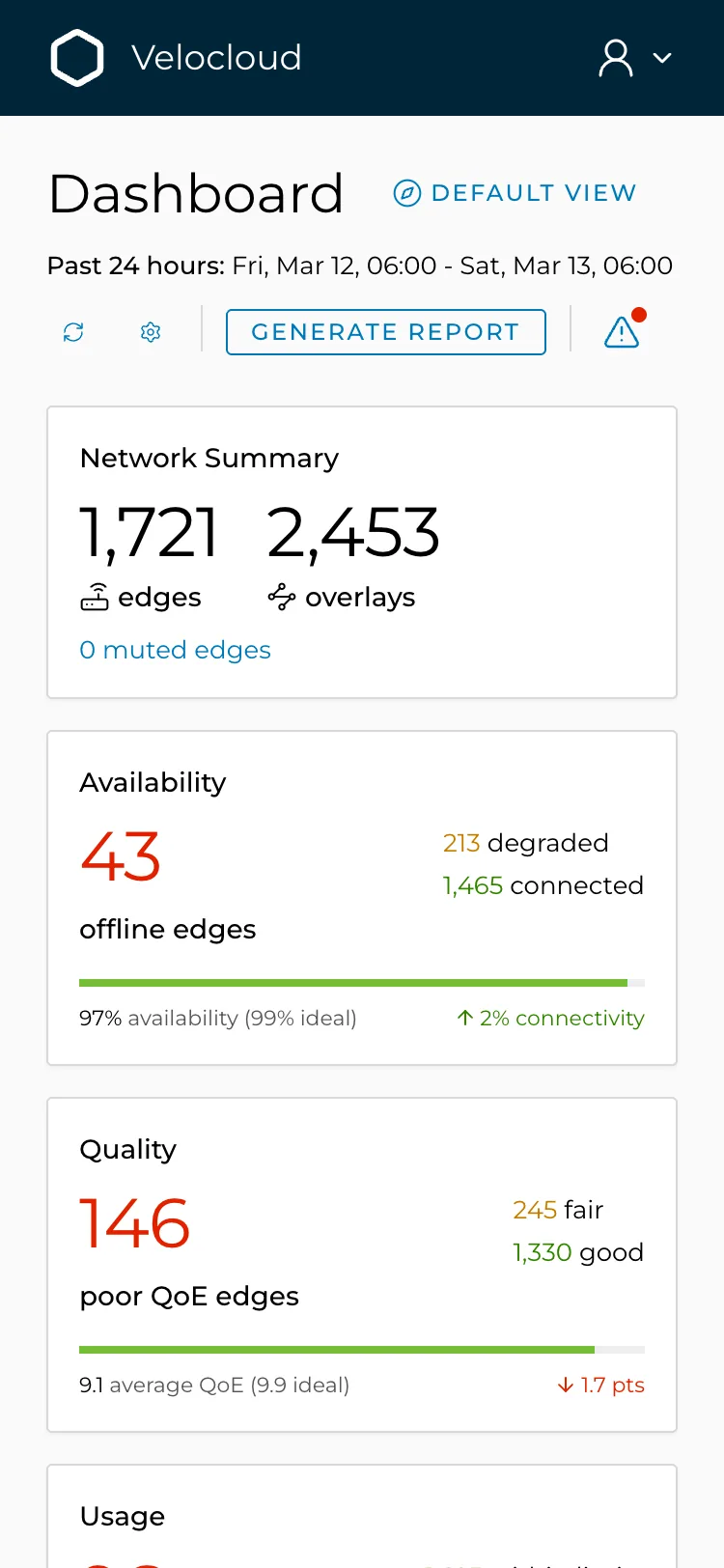
1,721 branch offices. 43 are down, 213 are limping, 146 are up but unusable. Sam does not need more data. He needs to know what to do next.
What does VeloCloud do, and where does the dashboard sit?
VeloCloud puts an edge in every branch, builds secure overlays across whatever lines the branch has, and steers traffic to the best path in real time. The Orchestrator is the one console admins like Sam use to watch all of it. This case study is its monitoring dashboard and the drill-down pages behind it.
What was mine to decide?
I owned the wireframes and interaction design for the monitoring dashboard and its drill-down pages: the summary layer, the ranked lists, the alerts panel and the detail tables. I worked with a Senior Designer at UXReactor over three months in 2019.
I was accountable for the information architecture and the interaction model, not the visual language.
So how does someone go from 1,721 edges to the one they should fix first?
What rules were the screens following?
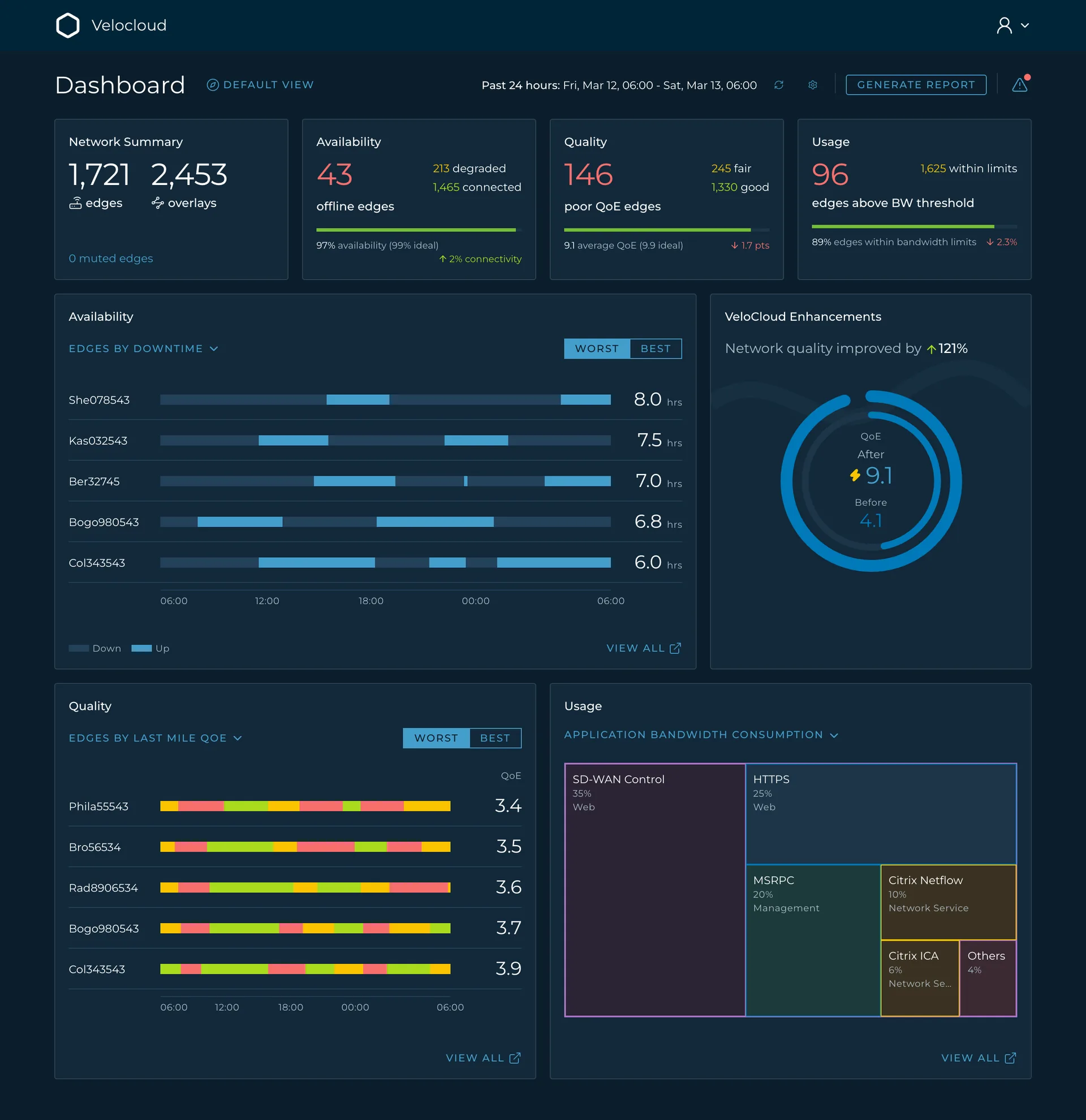
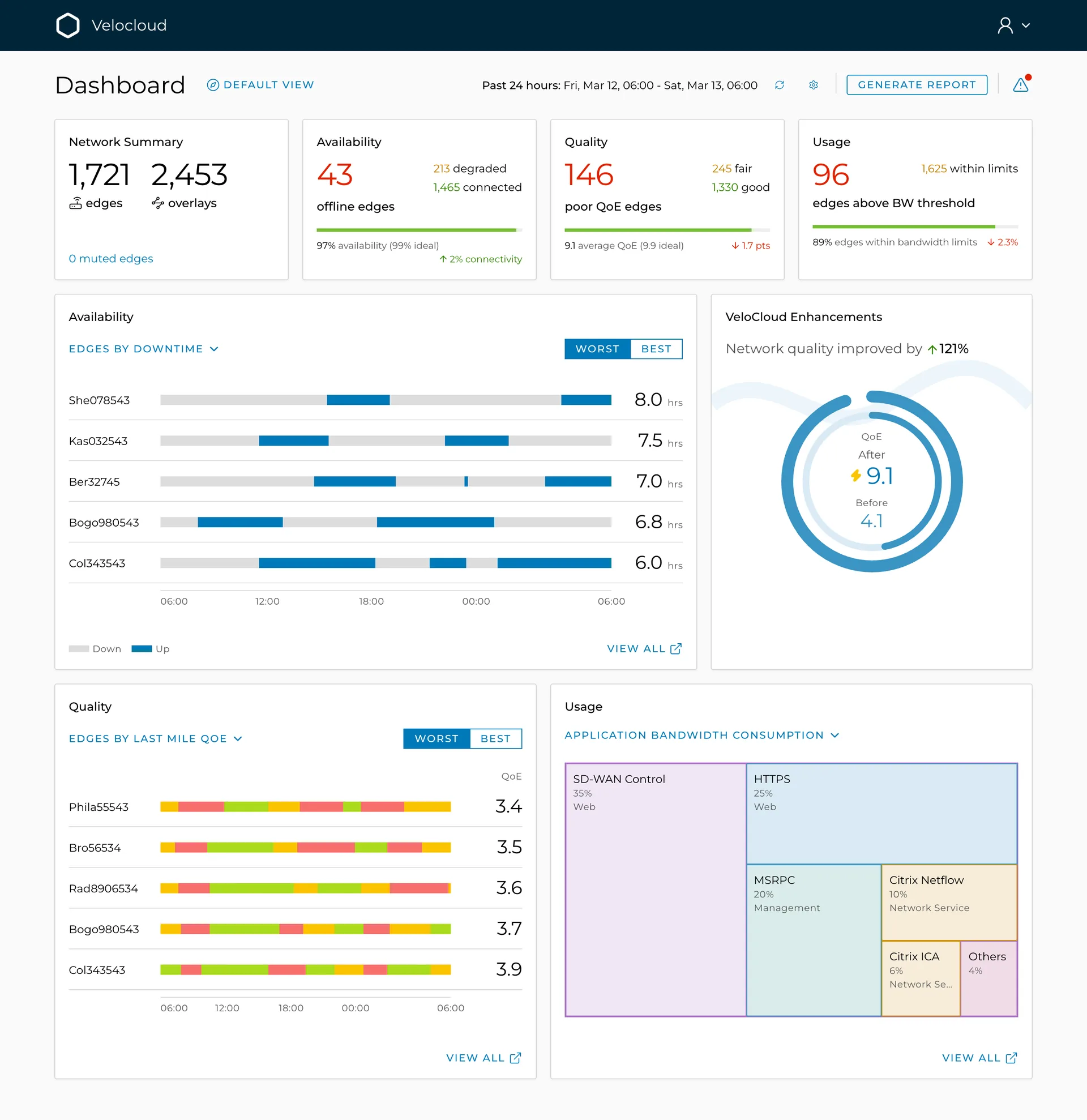
The direction was to surface critical information to Sam in a subtle, non-alarming way, instead of painting danger across the screen. Every colour was given one meaning, the state colours were kept for the few numbers that need them, and everything else sits in quiet greys and pastels, so the one red number is the first thing he sees. The system below is that direction written down, in light and in dark.
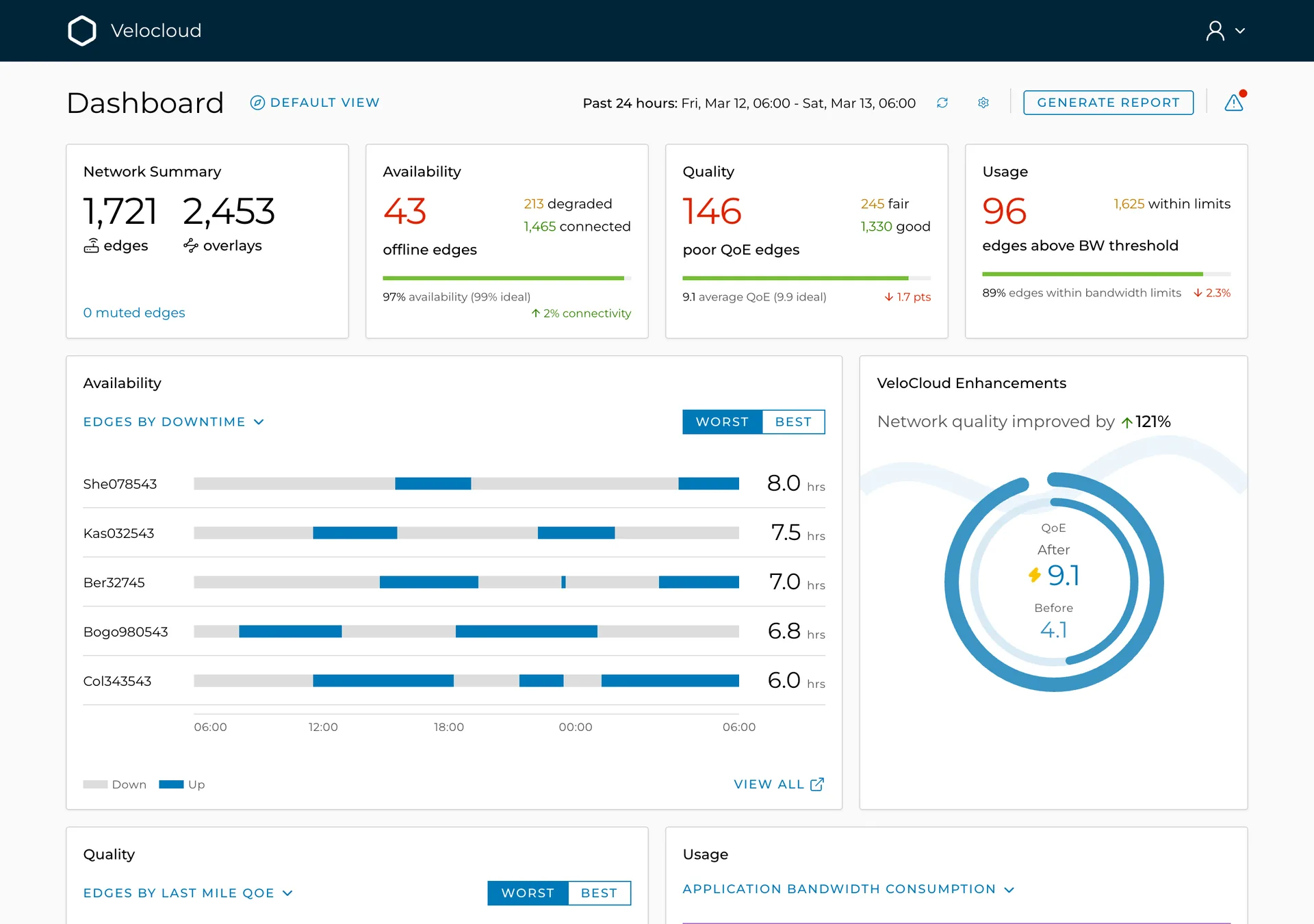
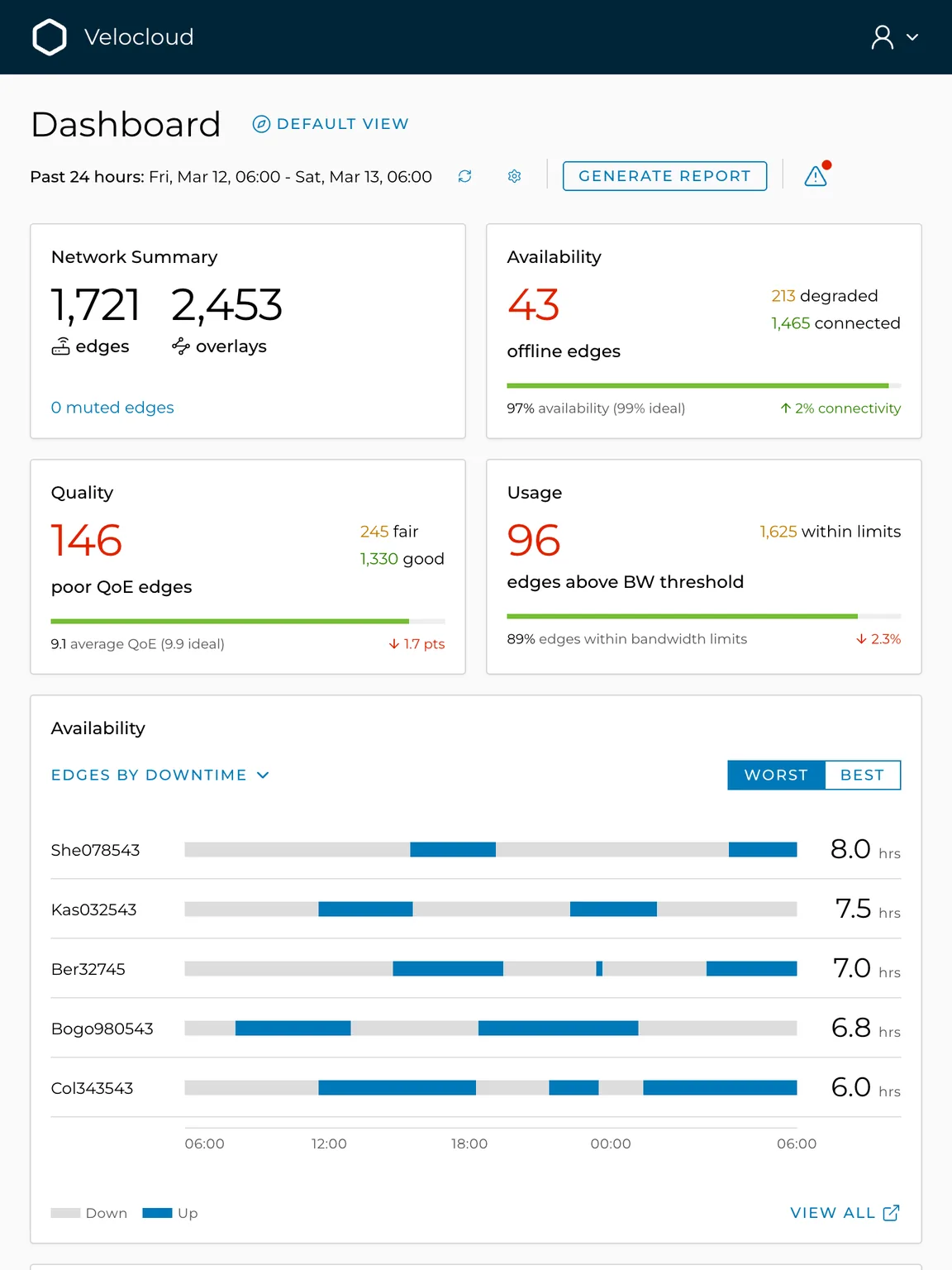
The same dashboard, three widths
What can Sam do now that he could not before?
First, how the whole page reads. Then five questions, in the order Sam asks them. Every number on the dashboard drills down, so nothing is a dead end.
Sam has a minute, and he does not want to read.
How does Sam read the whole page?
His eye lands on the top row and he has the shape of the day in one pass: how big the network is, how much of it is up, how much of it is good, how much of it is full. Nothing on the page is red unless it needs him, so the three red numbers are the whole story of the morning, and the green and amber beside them tell him it is a small share of a big estate.
Then the lists beneath put names to the numbers, and the same names come up twice: Bogo980543 and Col343543 sit in both the downtime list and the quality list. Sam knows before he clicks that one bad circuit is causing two symptoms. That is the snapshot: what is wrong, where, and whether it is the same place.
The size of the estate
1,721 edges and 2,453 overlays: the denominator for every other number
Up, good, full
availability, quality and usage in the same block, the bad bucket first
Who is down, and when
the worst edges by downtime, each row a 24-hour timeline
Who is up but unusable
the worst edges by last-mile QoE; two names here are also in list 3
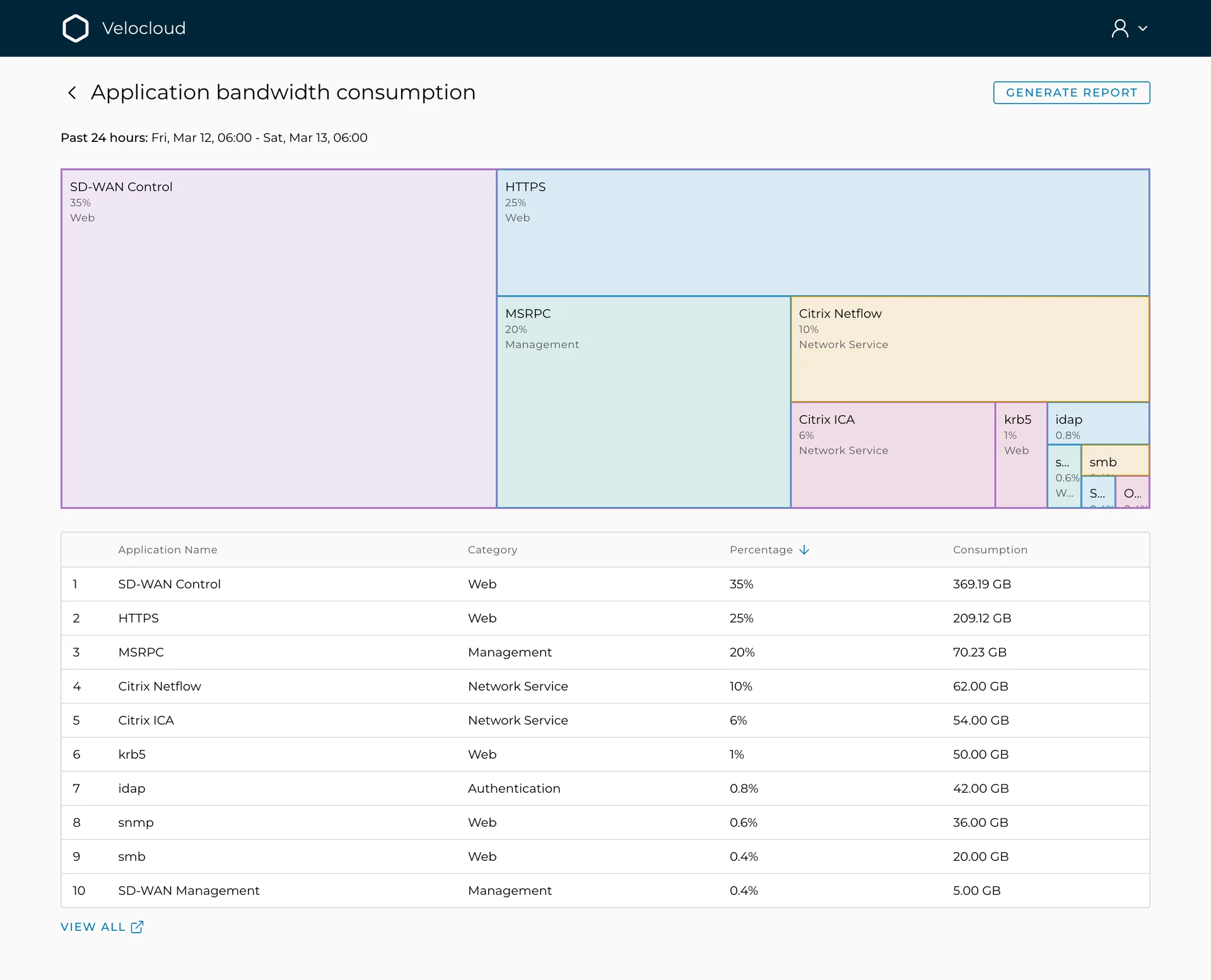
What is eating the bandwidth
applications by share, with category
What VeloCloud adds
QoE before and after the overlays: 4.1 to 9.1
What changed
the alerts and events drawer, with an unread dot
The old table showed everything, so nothing stood out.
Is anything on fire?
Sam does not count anything. Four cards tell him how many sites are down, how many are poor, how many are over their limit, and the figures beside each tell him how many are fine. Every card also says whether today is better or worse than yesterday and how far it is from the target, so he knows whether to worry before he knows what about.
The bad bucket, first
the headline count, in a state colour
The other two states
beside it, so the headline count is read against the rest
Against the ideal
a thin bar, and the target in brackets
The trend
an arrow and a delta, the direction of travel
The muted count
always visible, so a silent site is never a mystery to Sam
A site down 24 times in 8 hours is a bad cable, not an outage.
Which site do I fix first?
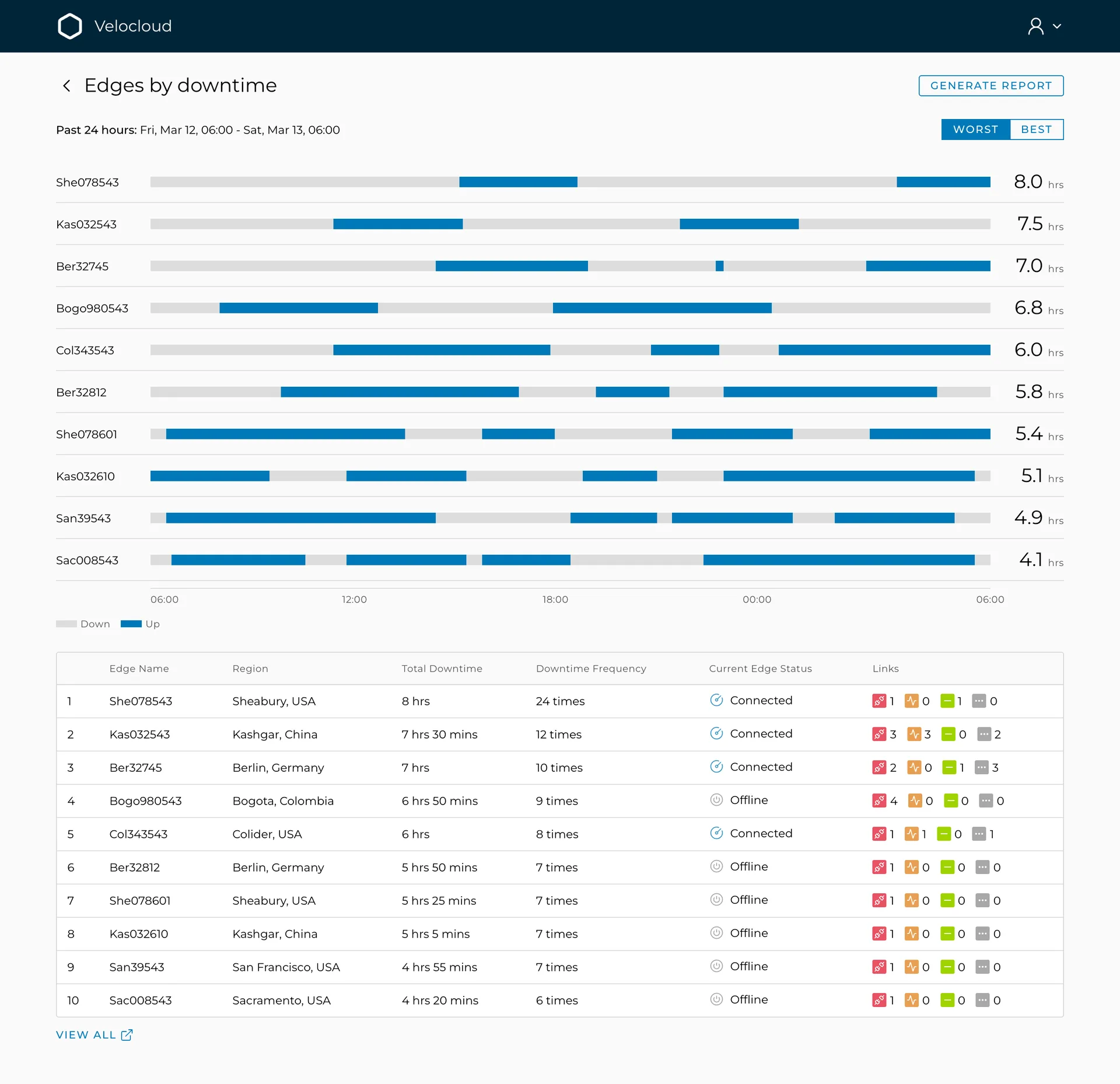
Sam reads the top of the list and has his first call. The bar beside each name shows him when the site dropped and how often, so he can tell a line that failed once from one that has been flapping all morning, which is a different repair. The counts under it say which of the site's links is the bad one, so he rings the right carrier. If he wants reassurance instead, one switch shows him the ten best.
When, not just how long
every row is a 24-hour timeline; short segments mean a flapping link
How many times
24 drops in 8 hours is a cable, not an outage
The links
down, degraded, stable, unknown: what Sam needs before calling the ISP
Worst first
the default everywhere; Best is for sanity checks
"Connected" and "unusable" can both be true.
Why is it slow when it is up?
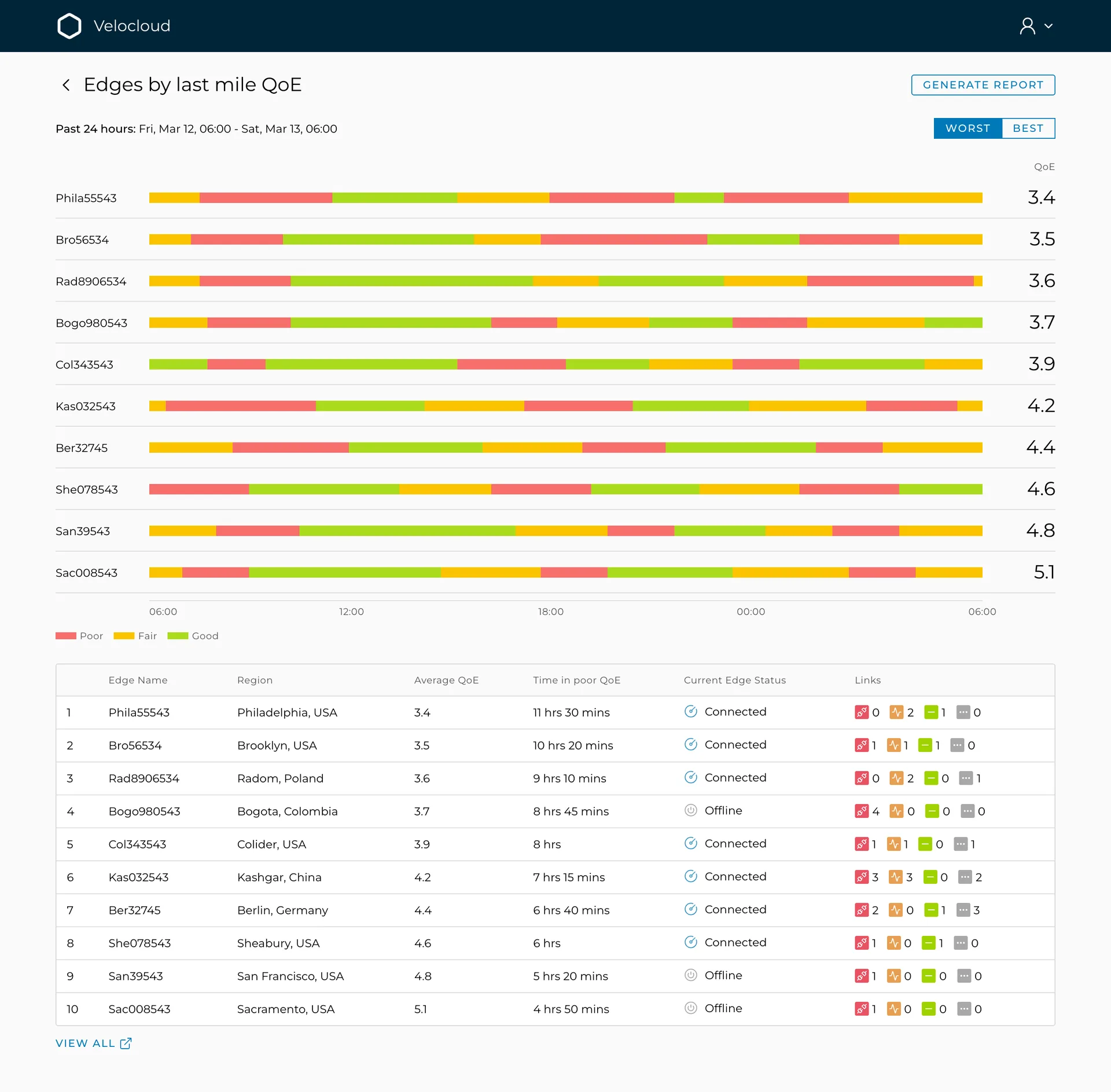
A site can be green on the availability card and still useless for a call. Sam sees that at once on the quality list: the strip beside each name turns red at the hour the line degraded and stays red for as long as it was bad, with one score that sums the day. He reads off the time it went red, and that is what goes into the ticket to the carrier.
When it went red
crisp colour boundaries, because the start time is the evidence
The score
0 to 10, from latency, jitter and packet loss on the ISP line
Time in poor QoE
how long the line was red: the number for the ticket
A spike is not the same as being full all day.
Are we running out of room?
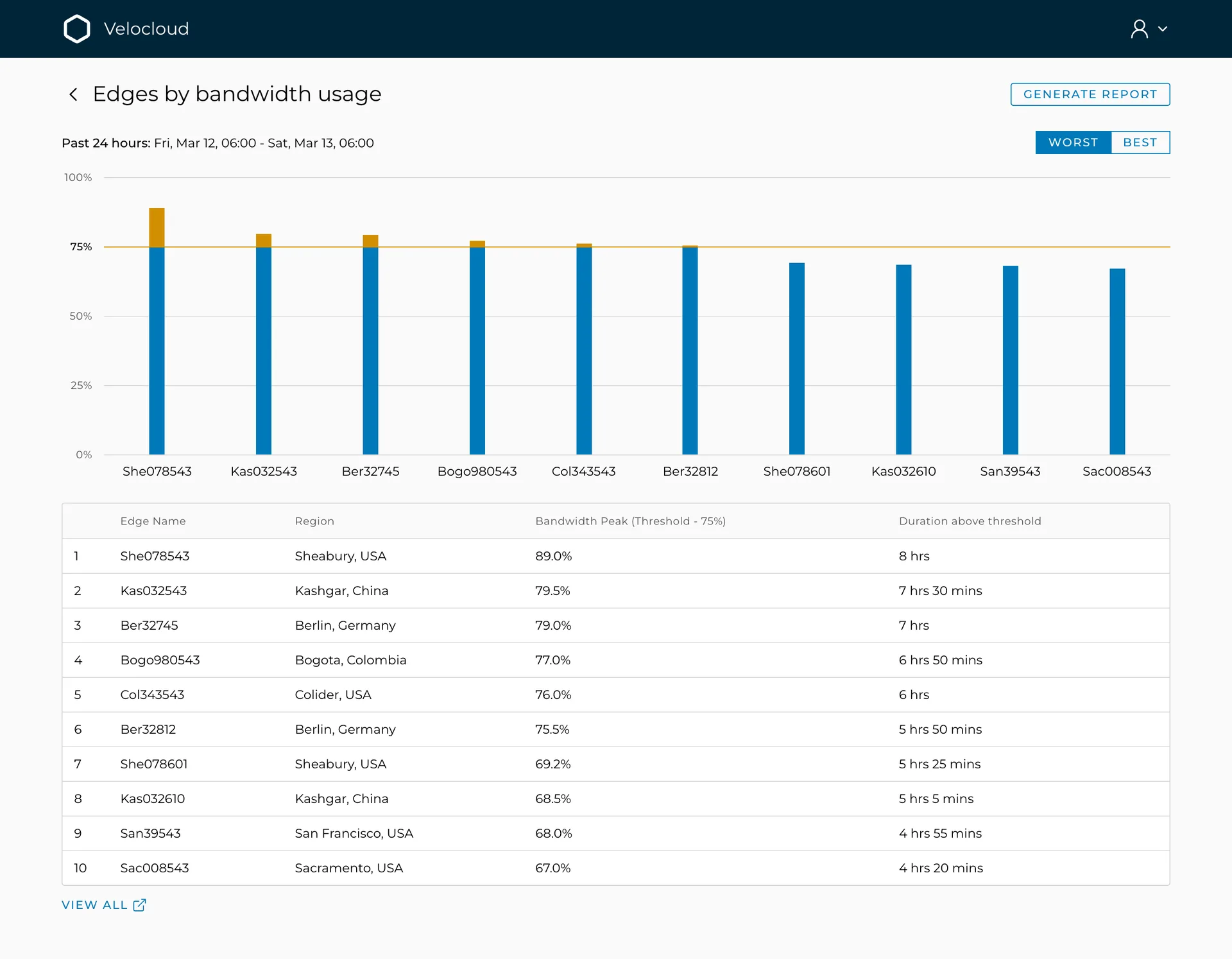
Sam set the threshold himself, so the line across the chart is his own early warning. He sees which sites crossed it, and the list ranks them by how long they stayed over rather than how high they spiked, because a long hot afternoon is a capacity problem and a one-minute spike is not. One click deeper he sees what the traffic was, so he can tell "real work grew" from "something is misbehaving".
Sam's threshold
a line at 75%, set by him, not by us
Over the line
only the part above his threshold changes colour
Ranked by duration
how long above, not how high: that ordering is the point
Which applications
tiles sized by share, with category
In gigabytes
so "real work grew" can be told from "something is misbehaving"
Some alerts need a human now. The rest is the audit trail.
What changed?
When the dot appears, Sam opens the drawer and sees two short lists: what needs him now, and what merely happened. He dismisses the duplicates and mutes the lab box he already knows about, and the counts fall to what is real. When someone asks next week when it all started, the second list has the answer.
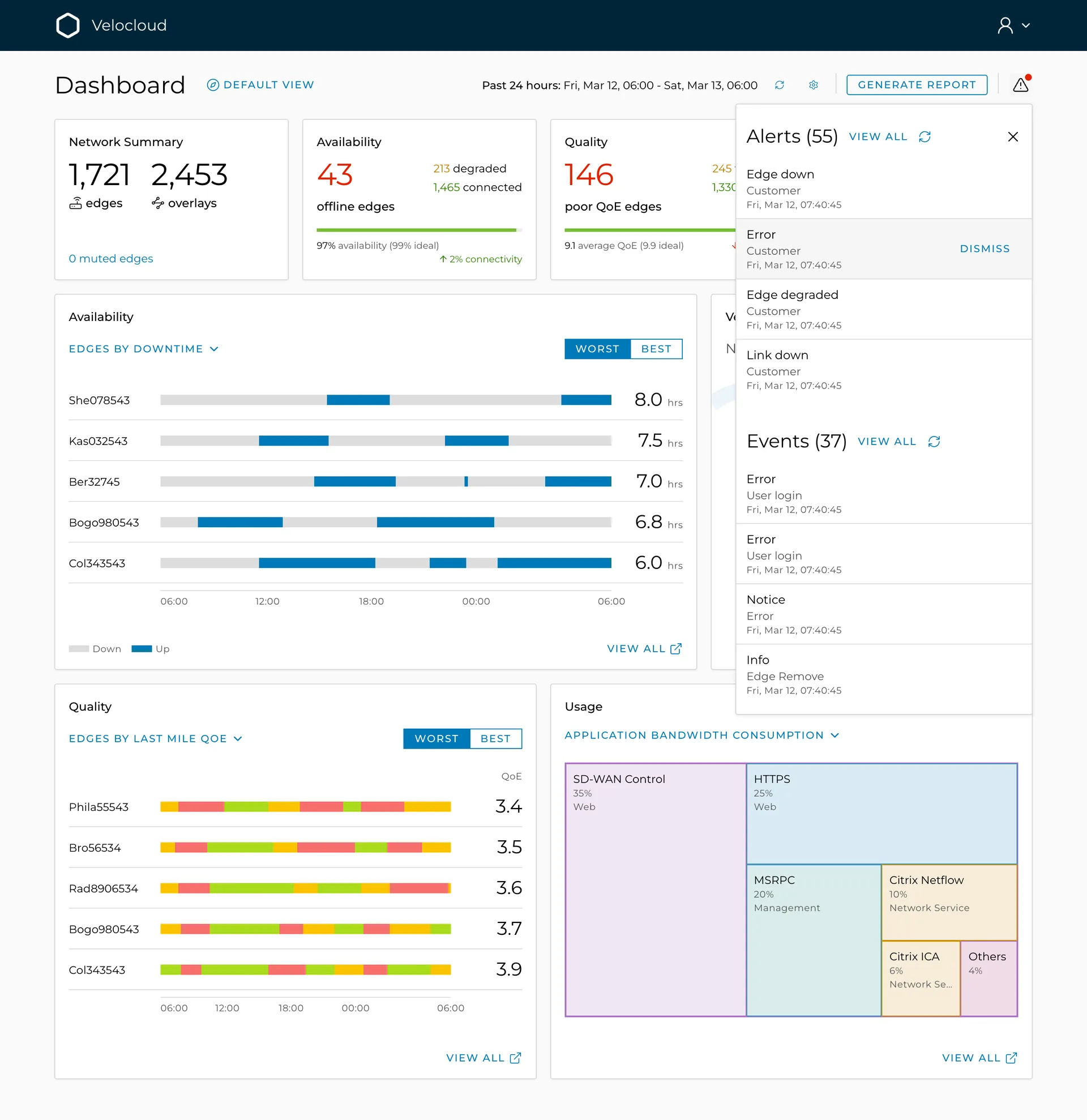
Alerts, 55
things that need a human now
Events, 37
the audit trail, for "when did this start?"
Type, customer, time
one row each; the hovered row offers Dismiss
Muted edges, counted
so the lab box Sam silenced is never a mystery to the next shift
How did we land on these charts?
A lot of A/B testing. Availability, quality and usage each wanted a different picture, so we put the candidate charts and representations in front of stakeholders and admins like Sam, version against version, until everyone agreed on the ones they found intuitive.
What came out of it: the timeline for downtime, the colour strip for quality, the bar against a line for usage, and the unit metric that holds all three in the same block.